Image
Wardogs │ ANCIENT
UndetectedInstant DeliveryDescription
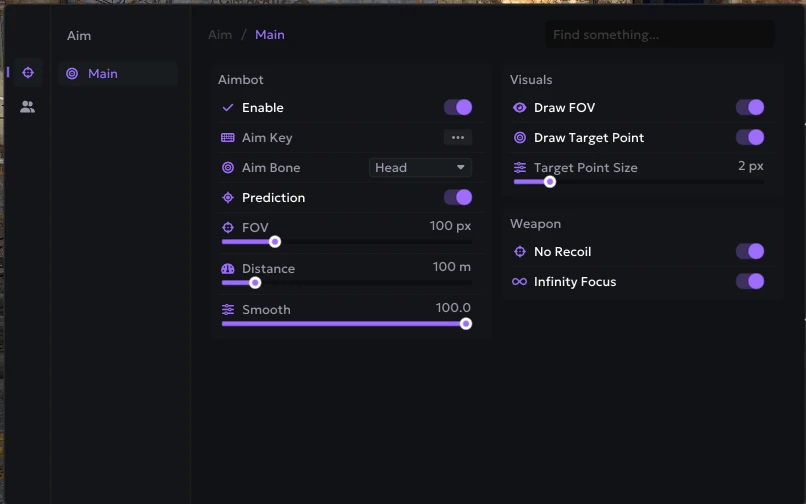
- Enable – enables automatic aiming
- Aim Key – assigns the activation key for the aimbot
- Aim Bone – allows you to select the body part the aimbot will aim at (head, neck, body)
- Prediction – accounts for target movement while aiming to improve accuracy
- FOV – adjusts the target acquisition area for the aimbot
- Smooth – adjusts the smoothness of aiming at the target
- Max Distance – sets the maximum aimbot working distance
- Draw FOV – displays the aimbot's working area on the screen
- Draw Target Point – shows the area the aim is directed at
- Target Point Size – adjusts the size of the aim point
- No Recoil – disables weapon recoil
- Infinity Focus – keeps infinite weapon focus without blur
- Instant Scope – provides instant aiming without delay
- Instant Hit – ensures an instant hit on the target
- Visible Check – aim works only on visible targets
- No Sway – disables weapon sway
- Magic Bullet – allows you to hit a target through obstacles
- Ignore Teammates – aim will ignore allies
- Ignore Players in Vehicle – aim will ignore players in vehicles
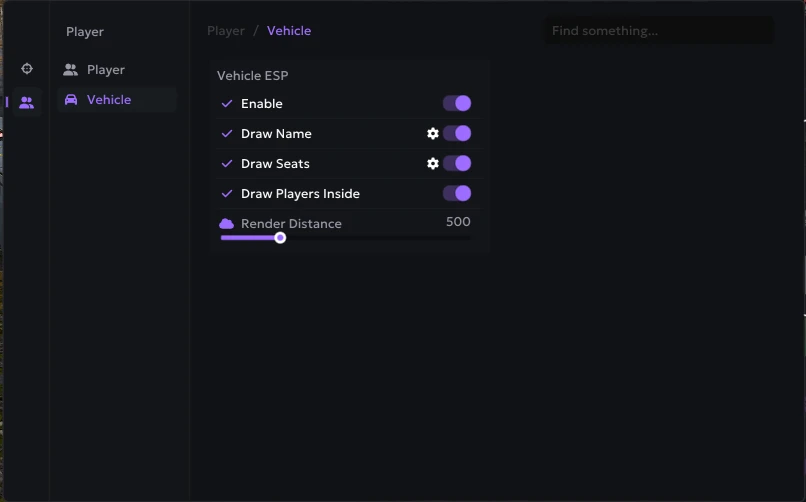
- Enable – enables vehicle display through ESP
- Draw Name – shows the vehicle name
- Draw Seats – displays seat information for the vehicle
- Draw Players Inside – shows players inside the vehicle
- Render Distance – sets the maximum vehicle render distance
- Dropped Item Names – shows the names of dropped items
- Loot Bag Rendering – displays bags with loot
- Loot Distance – shows the distance to loot
- Custom Name Colors – customizes the color of item names
- Custom Distance Colors – customizes the color of the distance to items
- Render Distance – sets the maximum display distance for loot
- Grenade – displays grenades on the map
- Land Mine – displays mines on the map
- Explosive – displays explosives and other dangerous objects
- Colors – allows you to customize the display color of grenades, mines, and explosives
- Render Distance – adjusts the maximum distance at which objects are displayed
- Grenade Warning – warns about a grenade within a 5‑meter radius
- Top-Center Warning – displays a warning about a grenade in the top‑center part of the screen
- Circle Indicator – shows the direction to the grenade using a circular indicator next to it
Operating system: Windows 10, Windows 11 (21H2, 22H2, 23H2, 24H2, 25H2)
Processor: AMD & INTEL
Video card: AMD & NVIDIA
Client: Steam
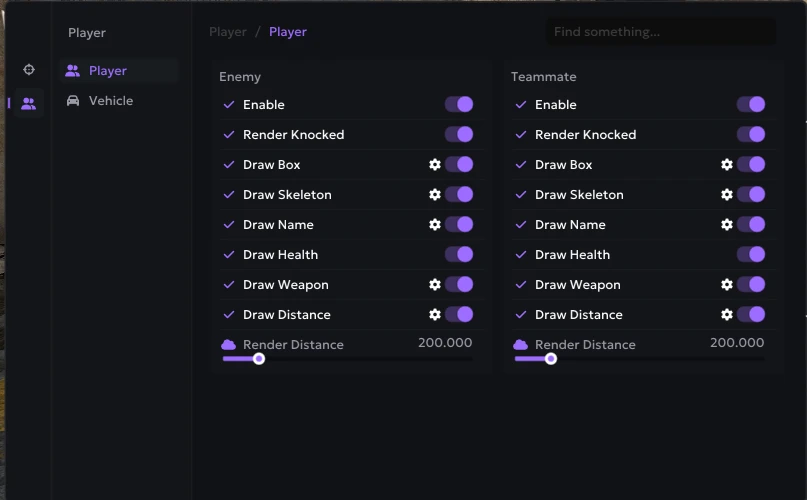
- Enemy – settings tab for enemy WH
- Teammate – ESP settings tab for teammates
- Enable – enables player display through ESP
- Render Knocked – allows displaying downed players
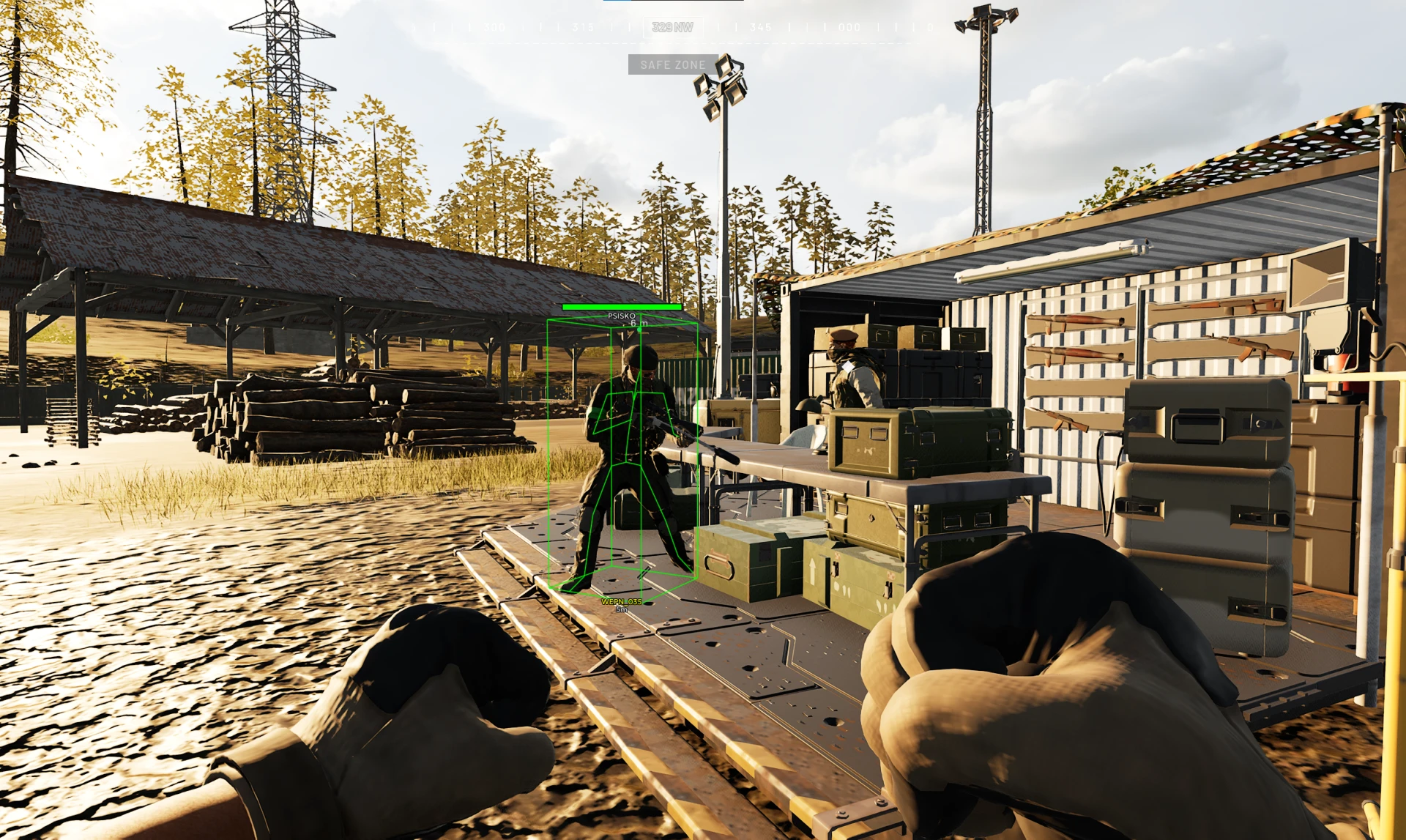
- Draw Box – displays boxes around players
- Draw Skeleton – shows the player's model skeleton through WH
- Draw Name – displays the player's name
- Draw Health – shows the player's health level
- Draw Weapon – displays the weapon in the player's hands
- Draw Distance – shows the distance to players
- Render Distance – sets the maximum player render distance
- Independent Target Selection – allows the function to independently select a target
- Hit Chance – adjusts the probability of the magic bullets triggering
- Magic Key – allows you to assign a separate key for magic bullets
- FOV – a separate setting for the target search area for Magic Bullet
- Distance – sets the maximum range for casting magic
- Bones – selects the body part to hit (Head, Neck, Body, Pelvis, or Nearest)
- Only Visible – limits the selection to only visible targets (outside cover)
- Ignore Teammates – excludes allies from the list of targets
- Ignore Players in Vehicles – ignores players in vehicles
- Red FOV Rendering – displays the FOV area in red
- Target Point Rendering – displays the point of the captured target
- Target Point Size – adjusts the size of the target point
- Talon 9K-SAM – displays Talon 9K-SAM air defense systems
- L81 Mortar – displays L81 Mortar mortars
- Stingray – displays Stingray objects
- Vanguard CIWS – displays Vanguard CIWS air defense systems
- Loudspeaker – displays loudspeakers
- FOB – displays forward operating bases
- Ally Building Rendering – displays ally buildings
- Building Name – shows the name of the building
- Team Name – shows the name of the building’s team
- Occupied Seats – shows the number of occupied seats
- Distance – shows the distance to the building
- Faction-Based Team Colors – colors the team name according to its faction
- Building Type Filters – filters for displaying specific types of buildings
- Menu Localization – the ability to change the language of the mod menu interface (English, Russian, Chinese)
- Overlay FPS Limit – allows you to limit the frame rate of the overlay
- Battle Mode – disable unnecessary ESP categories and leave only the player display (bindable)
- No Zoom Limit – increases the maximum zoom level for the scope for optics with zoom
- Custom ESP Colors – the ability to change the colors for various ESP parameters
- Mortar Helper – helps aim the mortar at a point set on the map and displays an indicator for the moment of a precise shot
Bundle Offers
Save when you add all items
✓ All bundle items in cart