Description
All Wardogs cheats More about Ancient cheats
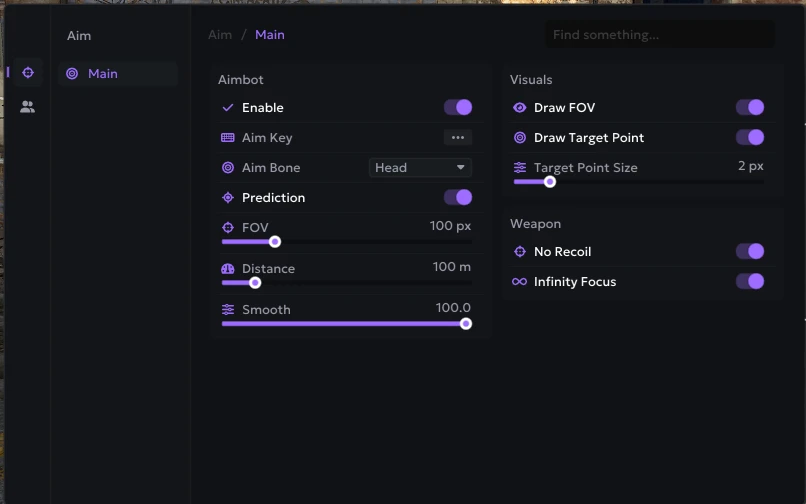
- Enable – enables automatic aiming
- Aim Key – assigns the activation key for the aimbot
- Aim Bone – allows you to select the body part the aimbot will aim at (head, neck, body)
- Prediction – accounts for target movement while aiming to improve accuracy
- FOV – adjusts the target acquisition area for the aimbot
- Smooth – adjusts the smoothness of aiming at the target
- Max Distance – sets the maximum aimbot working distance
- Draw FOV – displays the aimbot's working area on the screen
- Draw Target Point – shows the area the aim is directed at
- Target Point Size – adjusts the size of the aim point
- No Recoil – disables weapon recoil
- Infinity Focus – keeps infinite weapon focus without blur
- Instant Scope – provides instant aiming without delay
- Instant Hit – ensures an instant hit on the target
- Visible Check – aim works only on visible targets
- No Sway – disables weapon sway
- Magic Bullet – allows you to hit a target through obstacles
- Ignore Teammates – aim will ignore allies
- Ignore Players in Vehicle – aim will ignore players in vehicles
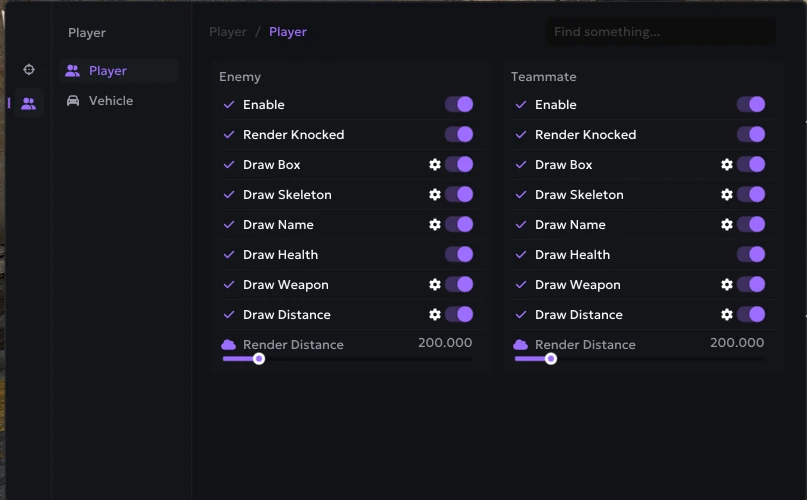
- Enemy – settings tab for enemy WH
- Teammate – ESP settings tab for teammates
- Enable – enables player display through ESP
- Render Knocked – allows displaying downed players
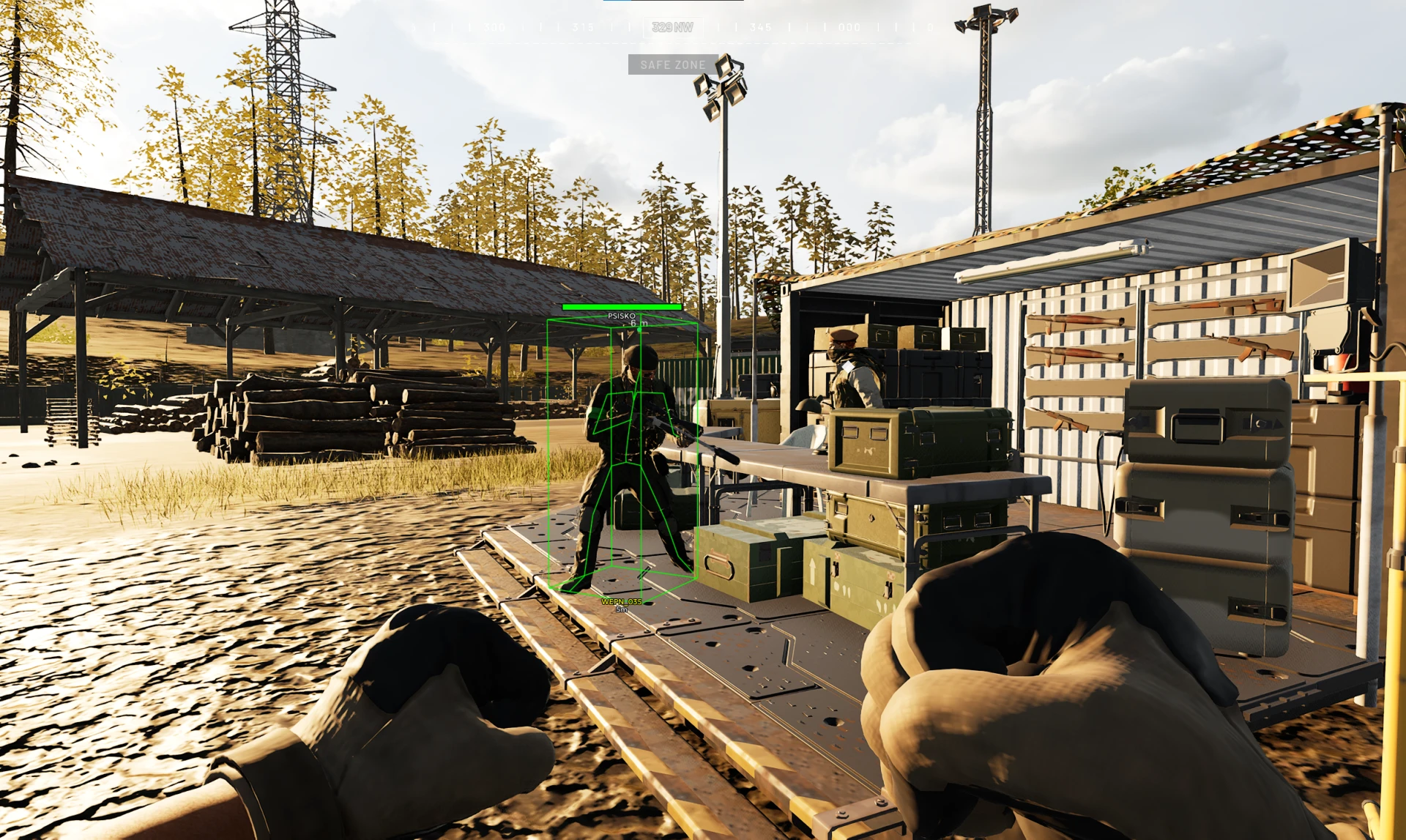
- Draw Box – displays boxes around players
- Draw Skeleton – shows the player's model skeleton through WH
- Draw Name – displays the player's name
- Draw Health – shows the player's health level
- Draw Weapon – displays the weapon in the player's hands
- Draw Distance – shows the distance to players
- Render Distance – sets the maximum player render distance
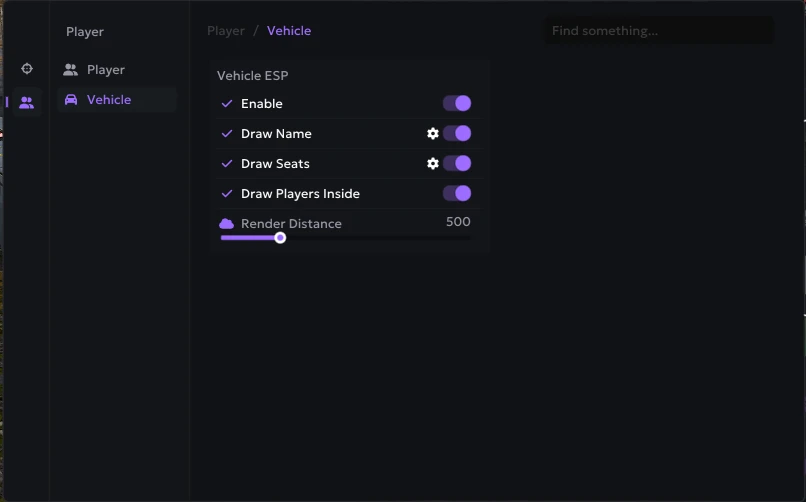
- Enable – enables vehicle display through ESP
- Draw Name – shows the vehicle name
- Draw Seats – displays seat information for the vehicle
- Draw Players Inside – shows players inside the vehicle
- Render Distance – sets the maximum vehicle render distance
- Independent Target Selection – allows the function to independently select a target
- Hit Chance – adjusts the probability of the magic bullets triggering
- Magic Key – allows you to assign a separate key for magic bullets
- FOV – a separate setting for the target search area for Magic Bullet
- Distance – sets the maximum range for casting magic
- Bones – selects the body part to hit (Head, Neck, Body, Pelvis, or Nearest)
- Only Visible – limits the selection to only visible targets (outside cover)
- Ignore Teammates – excludes allies from the list of targets
- Ignore Players in Vehicles – ignores players in vehicles
- Red FOV Rendering – displays the FOV area in red
- Target Point Rendering – displays the point of the captured target
- Target Point Size – adjusts the size of the target point
- Dropped Item Names – shows the names of dropped items
- Loot Bag Rendering – displays bags with loot
- Loot Distance – shows the distance to loot
- Custom Name Colors – customizes the color of item names
- Custom Distance Colors – customizes the color of the distance to items
- Render Distance – sets the maximum display distance for loot
- Talon 9K-SAM – displays Talon 9K-SAM air defense systems
- L81 Mortar – displays L81 Mortar mortars
- Stingray – displays Stingray objects
- Vanguard CIWS – displays Vanguard CIWS air defense systems
- Loudspeaker – displays loudspeakers
- FOB – displays forward operating bases
- Ally Building Rendering – displays ally buildings
- Building Name – shows the name of the building
- Team Name – shows the name of the building’s team
- Occupied Seats – shows the number of occupied seats
- Distance – shows the distance to the building
- Faction-Based Team Colors – colors the team name according to its faction
- Building Type Filters – filters for displaying specific types of buildings
- Grenade – displays grenades on the map
- Land Mine – displays mines on the map
- Explosive – displays explosives and other dangerous objects
- Colors – allows you to customize the display color of grenades, mines, and explosives
- Render Distance – adjusts the maximum distance at which objects are displayed
- Grenade Warning – warns about a grenade within a 5‑meter radius
- Top-Center Warning – displays a warning about a grenade in the top‑center part of the screen
- Circle Indicator – shows the direction to the grenade using a circular indicator next to it
- Menu Localization – the ability to change the language of the mod menu interface (English, Russian, Chinese)
- Overlay FPS Limit – allows you to limit the frame rate of the overlay
- Battle Mode – disable unnecessary ESP categories and leave only the player display (bindable)
- No Zoom Limit – increases the maximum zoom level for the scope for optics with zoom
- Custom ESP Colors – the ability to change the colors for various ESP parameters
- Mortar Helper – helps aim the mortar at a point set on the map and displays an indicator for the moment of a precise shot
Operating system: Windows 10, Windows 11 (21H2, 22H2, 23H2, 24H2, 25H2)
Processor: AMD & INTEL
RAM: 16 GB
Video card: AMD & NVIDIA
Client: Steam
A normal Windows install is required: not Enterprise, not optimized or repacked.
Ancient for WARDOGS is a full mod menu with deep customization. Its vector aimbot offers bone selection, FOV, smoothing, prediction and a distance limit, and you can set the aim point and its size; no recoil and infinite focus make shooting more comfortable. The player ESP handles enemies and teammates separately, with boxes, skeletons, names, health, weapons, distance and knocked players. The vehicle ESP shows vehicles with their names, seats and the players inside. A strong choice if you want precise aimbot tuning and informative visuals without unnecessary extras.
Wardogs │ ANCIENT
Undetected- Instant delivery: your key arrives by email and on your order page.
- Setup guide and loader included.
- 24/7 support tickets.
Questions before you buy? Open a ticket
Latest updates
All updatesBundle Offers
Save when you add all items